World streaming
Split a large level into cells that load and unload around the player while the game runs, with their colliders, navmesh and terrain, within a time and memory budget.
A streamed world keeps only the part of the level near the player in memory. The level scene stays the persistent layer: what must always exist (cameras, the sun, characters, spawn points, game logic). Everything with a place in the world (meshes, prefab instances, colliders, lights, sounds, terrain tiles) lives in cells, square regions of the ground that load when a streaming source comes near and unload when it leaves.
Cells and the world asset
A world is a .kworld asset beside the scene, with a folder of the same name plus .cells that holds one file per cell. Each cell file holds the cell's entities with all their components and their own entity IDs, and, when the level has a baked navmesh, a second file with the cell's navmesh tiles.
Cells are cooked like scenes: the packaged game reads compact binary cells, and the cells folder ships with its world asset. Renaming or moving the world asset in the Content Browser moves its cells too. A scene without a World Partition component never streams; existing levels load exactly as before.
Content/Scenes
Level.kscene                persistent layer (World Partition component)
Level.kworld                cell grid: cell size, cells, sizes
Level.kworld.cells/
  cell_0_0.kcell            the cell's entities
  cell_0_0.kcellnav         the cell's navmesh tiles
  world.kcellnav            the navmesh grid every cell's tiles join
Partition a scene
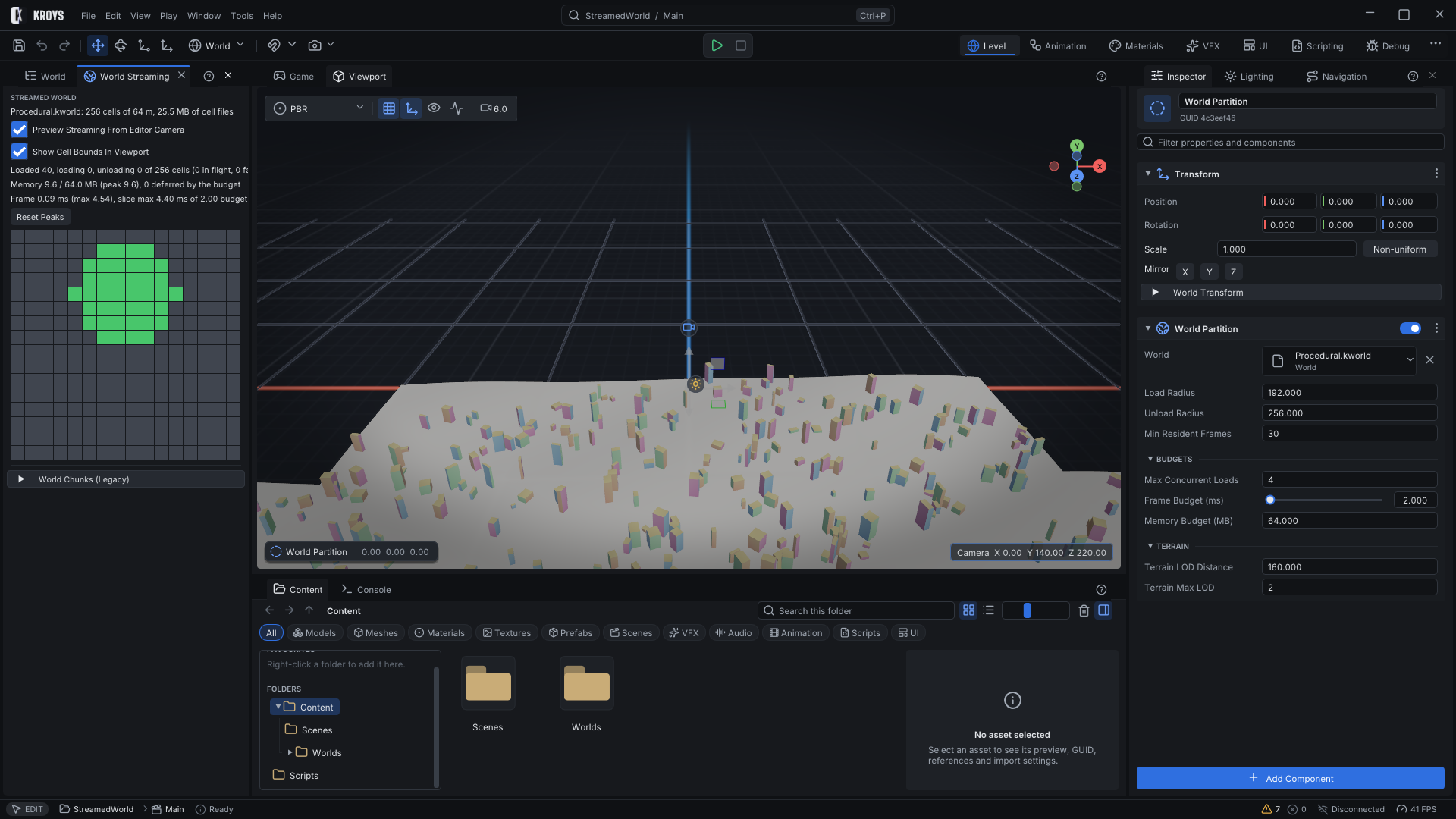
Open the World Streaming panel, set the Cell Size and press Partition Scene Into Cells. Every root entity whose hierarchy holds spatial content moves, with its children, into the cell under its position. The rest stays in the scene:
- entities with a World Persistent component (add it to anything that must never unload),
- cameras, directional lights, streaming sources, navmesh surfaces, characters, spawn points, UI canvases, audio listeners and oceans,
- logic-only entities without meshes, colliders, terrain, lights or sounds.
Partitioning is one step in the edit history: Undo brings every entity back into the scene and removes the partition. A baked navmesh of the scene's NavMesh Surface is split into the cells at the same time; bake it before partitioning.
Streaming sources
Cells load around World Streaming Source components (put one on the player or its camera); without any, around the primary camera. Each source keeps every cell within the Load Radius of the World Partition component loaded. A loaded cell stays until every source is beyond the Unload Radius, so walking back and forth along a cell border never reloads it, and it stays at least Min Resident Frames frames. Several sources share cells: a cell unloads only when no source and no pin needs it.
On the dedicated server every connected player is a streaming source, so each player stands on loaded ground, collides with the level and server bots find paths around them. Before anyone joins, the server keeps the cells around the spawn points loaded.
Budgets
Cells are read and decoded on worker threads; the main thread only creates and destroys their entities, a few at a time. The World Partition component sets the limits:
| Setting | What it limits |
|---|---|
| Max Concurrent Loads | Cells being read and decoded at the same time. |
| Frame Budget (ms) | Main-thread time per frame spent creating and destroying cell entities; the rest waits for the next frame, so a cell may appear over a few frames instead of stalling one. |
| Memory Budget (MB) | Estimated memory of loaded and loading cells. Nearer cells load first; farther ones wait until memory frees up. |
| Terrain LOD Distance, Terrain Max LOD | Terrain tiles farther than one LOD distance render with every second sample, then every fourth; their collision always uses the full detail. |
Colliders of loaded cells join the physics world as their entities appear and leave with them, navmesh tiles join and leave the level navmesh, and terrain tiles build their mesh when their cell loads and free it when it unloads.
Preview and inspect in the editor
The World Streaming panel shows the world's cells as a map coloured by state: grey unloaded, yellow loading, orange appearing, green loaded, purple unloading, red failed. Hover a cell for its entities, size, distance and terrain detail level; click it to pin it, which keeps it loaded whatever the distance.
Preview Streaming From Editor Camera streams the cells around the Viewport camera while you edit, so you can fly through the world and see it load. Previewed entities are never saved into the scene and disappear when the preview stops or Play starts; the panel shows the loaded cells, memory against the budget and the time spent per frame. Show Cell Bounds In Viewport outlines every cell on the ground in its state colour.
To change what is inside a cell, undo the partition, edit the level and partition it again.
Saves and multiplayer
A streamed entity has the same entity ID every time its cell loads, on every machine. Save games, network replication and references between entities find it whenever its cell is loaded.
KroysEngine 0.1.0 documentation, built from the engine repository by Tools/BuildDocsSite.py.